
Training Room AV Design Guide: How to Design a High-Performance Learning Space
A well-designed training room AV system does more than display presentations and play audio. It creates a reliable learning environment where every participant can clearly see, hear, interact with, and understand training content.
The right training room AV design combines displays, projectors, speakers, microphones, cameras, control systems, connectivity, lighting, and room acoustics into a coordinated system. The goal is not simply to install the most advanced equipment, but to select technology based on the room's size, seating layout, viewing distance, audience capacity, training format, and operational requirements.
For example, a small classroom may only require a commercial display, soundbar, wireless presentation system, and simple control panel. A large corporate training room may need multiple displays, distributed speakers, wireless microphones, cameras, automated switching, room scheduling, and centralized AV control.
A successful training room AV design therefore starts with the learning experience and room requirements, not individual equipment specifications.
This guide explains how to plan a training room AV system, choose the right displays and audio equipment, design control systems, avoid common mistakes, and create an AV environment that is scalable, accessible, reliable, and easy to operate.
Key Takeaways
Start training room AV design with room size, seating capacity, viewing distance, and training requirements.
Choose displays based on screen size, viewing distance, resolution, brightness, and room lighting.
Use projectors when very large images or flexible screen placement are important.
Design audio for speech intelligibility rather than simply maximizing volume.
Microphone selection should match the instructor's movement and training format.
A centralized control system can simplify displays, audio, source selection, lighting, and conferencing.
Room acoustics can significantly affect speech clarity and conferencing performance.
Provide appropriate wired and wireless connectivity for presenters and participants.
Design for accessibility, including captions, hearing assistance, clear sightlines, and intuitive controls.
Document the system and train users before deployment.
Test the complete AV workflow under realistic operating conditions.
Plan for maintenance, future expansion, software updates, and equipment replacement.
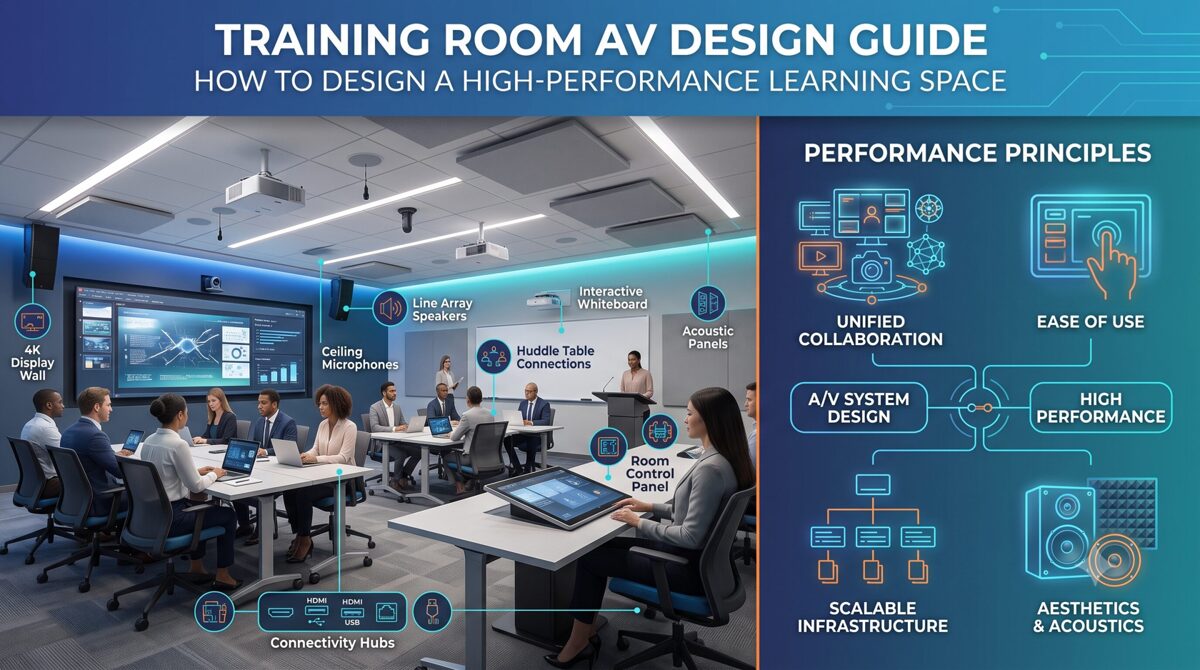
What Is Training Room AV Design?
Training room AV design is the process of planning and integrating audiovisual technologies to support teaching, presentations, collaboration, communication, and remote participation within a training environment.
A complete training room AV system can include:
Displays
Projectors
Projection screens
Speakers
Amplifiers
Digital signal processors
Wireless microphones
Wired microphones
Cameras
Video conferencing equipment
Presentation systems
HDMI and USB connectivity
Network infrastructure
AV-over-IP systems
Control processors
Touch panels
Room scheduling systems
Lighting controls
Acoustic treatments
The exact equipment depends on the room and its intended use.
Why Training Room AV Design Matters
Poor AV design can create problems even when high-quality equipment has been installed.
Common issues include:
Participants unable to read presentation content
Inconsistent audio levels
Microphone feedback
Poor speech intelligibility
Screen glare
Complicated controls
Incompatible presentation devices
Camera framing problems
Cable clutter
Insufficient connectivity
Poor acoustics
Difficult troubleshooting
A properly engineered system addresses these issues before installation.
How to Assess a Training Room Before AV Design
Before selecting equipment, conduct a training room AV site assessment.
The assessment should document the physical room, technology requirements, and expected user experience.
1. Room Dimensions
Record:
Room length
Room width
Ceiling height
Wall dimensions
Window locations
Door locations
Available mounting surfaces
These measurements influence display placement, speaker positioning, projector selection, and cable routing.
2. Seating Capacity
Determine the maximum number of participants.
A room designed for 12 people has very different AV requirements from a training facility designed for 100 people.
Consider:
Number of seats
Seating arrangement
Instructor location
Participant sightlines
Viewing distance
Accessibility requirements
3. Seating Layout
Common layouts include:
Classroom
Theater
Boardroom
U-shape
Conference
Cluster
Flexible/movable seating
The seating configuration can affect display positioning and speaker coverage.
4. Training Format
Ask how the room will actually be used.
For example:
Instructor-led training
Corporate presentations
Product demonstrations
Software training
Hybrid learning
Remote training
Video playback
Collaborative workshops
Certification sessions
Executive presentations
The AV system should be designed around these use cases.
Choosing the Right Displays for a Training Room
Display selection is one of the most important parts of training room AV design.
The primary options are:
Flat-panel displays
Large-format commercial displays
LED displays
Projectors and projection screens
Flat-Panel Displays
Commercial displays are often effective for small and medium-sized training rooms.
Advantages include:
High image quality
Strong brightness
Easy installation
Low maintenance
Good performance in bright rooms
Simple source connectivity
However, one display may not provide sufficient viewing size for a large room.
LED Displays
Direct-view LED can be appropriate for larger training environments where a very large image is required.
Potential advantages include:
Large screen sizes
High brightness
Excellent visibility
Flexible aspect ratios
Strong visual impact
The trade-offs can include higher installation costs, more complex infrastructure, and greater system engineering requirements.
Projectors
Projectors remain useful when the training room requires a large image but a large direct-view display is impractical.
They can be appropriate for:
Large training rooms
Auditoriums
Flexible spaces
Large presentation environments
However, projector selection requires careful consideration of:
Brightness
Throw distance
Lens
Screen size
Screen gain
Ambient light
Resolution
Mounting location
For projector-specific planning, a Projector Screen Size Calculator can help determine screen dimensions based on diagonal size and aspect ratio.
How to Choose the Right Screen Size
The correct display size depends on more than room dimensions.
Consider:
Furthest viewing position
Closest viewing position
Content type
Font size
Image detail
Room lighting
Screen resolution
Seating arrangement
Training rooms often display text-heavy content, spreadsheets, diagrams, software interfaces, and instructional videos.
Therefore, the display should allow participants at the back of the room to comfortably read important information.
For detailed screen calculations, a Screen Dimension Calculator can help determine width, height, diagonal, and aspect ratio.
Display Size Is Not the Same as Resolution
A large screen does not automatically produce a better viewing experience.
Consider both:
Physical screen size + resolution + viewing distance + content type
A display that is technically high-resolution may still be unsuitable if text is too small for participants sitting far away.
Training Room Audio Design
Audio is arguably one of the most important parts of a training room AV system because training depends heavily on speech.
The objective is not simply to make the room loud.
The objective is to provide clear, consistent, intelligible speech throughout the seating area.
A training room audio system may include:
Ceiling speakers
Wall-mounted speakers
Pendant speakers
Soundbars
Amplifiers
Digital signal processors
Wireless microphones
Boundary microphones
Lavalier microphones
Headset microphones
Speaker Placement
Speaker placement should provide consistent coverage across the audience.
Avoid designing a system where participants sitting near the speaker hear dramatically more volume than participants at the back.
The acoustic characteristics of the room should also be considered.
Speech Intelligibility
Speech intelligibility is especially important for:
Instructor-led training
Video conferencing
Remote learning
Technical demonstrations
Compliance training
Presentations
Room acoustics, speaker placement, microphone selection, processing, and background noise all affect intelligibility.
Choosing Training Room Microphones
Microphone selection should reflect how instructors and participants interact.
Lavalier Microphones
Lavalier microphones are useful when instructors need hands-free operation.
They work well for:
Lectures
Demonstrations
Instructor-led training
Presentations
Headset Microphones
Headsets can provide consistent microphone positioning and are useful when instructors move around frequently.
Handheld Microphones
Handheld microphones are useful for:
Q&A
Audience participation
Panel discussions
Events
Boundary Microphones
Boundary microphones can be useful for collaborative tables and conferencing applications.
Wireless vs Wired Microphones
Wireless microphones provide mobility but introduce additional considerations such as:
Battery management
RF coordination
Wireless interference
Charging
Security
Maintenance
A professional training room should include an operational plan for microphone batteries and spares.
Video Conferencing for Hybrid Training Rooms
Modern training environments increasingly need to support participants who are not physically present.
A hybrid training room may require:
PTZ camera
Instructor camera
Audience camera
USB connectivity
Video conferencing platform integration
Echo cancellation
Microphone array
Speaker system
Content sharing
Automatic camera tracking
Camera Positioning
Camera placement should provide a useful view of the instructor, presenter, participants, or training activity.
Consider:
Camera height
Viewing angle
Lighting
Background
Field of view
Participant seating
Avoid positioning the camera where windows or bright lights create strong backlighting.
Training Room AV Control Systems
A control system connects the different AV components into an easier-to-use interface.
Instead of requiring users to operate multiple remote controls, a centralized interface can provide common functions such as:
System power
Display selection
Source selection
Volume control
Microphone control
Presentation sharing
Video conferencing
Screen control
Lighting
Room presets
Why AV Control Matters
A technically sophisticated AV system can still fail operationally if users cannot understand how to use it.
The best training room control interface should be:
Simple
Consistent
Clearly labeled
Responsive
Accessible
Easy to troubleshoot
One-Touch Room Presets
Useful presets may include:
Training Mode
Display on
Presentation source selected
Microphone enabled
Standard lighting
Video Conference Mode
Camera activated
Microphones enabled
Conference source selected
Display configured
Presentation Mode
Presenter source selected
Appropriate display configuration
Audio enabled
These presets reduce the number of steps required from instructors.
Connectivity and Signal Distribution
A training room should support the devices presenters are likely to bring.
Common interfaces include:
HDMI
USB-C
USB
DisplayPort
Wireless presentation
Network connectivity
HDMI and USB-C
HDMI remains common for video distribution, while USB-C is increasingly important for modern laptops.
When designing connectivity, consider:
Cable length
Signal resolution
Connector compatibility
Adapters
Charging requirements
Cable management
Wireless Presentation
Wireless presentation systems can reduce cable clutter and allow presenters to share content from compatible devices.
However, network configuration, security, compatibility, and user authentication should be considered during design.
Room Acoustics and Lighting
AV equipment cannot compensate completely for poor room conditions.
Acoustics
Consider:
Reverberation
Hard reflective surfaces
HVAC noise
Outside noise
Room geometry
Acoustic treatment
Acoustic treatment can improve speech clarity and reduce unwanted reflections.
Lighting
Lighting affects both local presentations and video conferencing.
Consider:
Screen glare
Ambient light
Window placement
Instructor lighting
Camera exposure
Dimmable lighting
A good training room should provide enough illumination for participants to take notes while maintaining suitable screen visibility.
Accessibility in Training Room AV Design
Accessibility should be part of AV planning rather than an afterthought.
Depending on the environment, consider:
Closed captions
Assistive listening systems
Accessible control interfaces
Appropriate screen placement
Clear sightlines
Hearing assistance
Accessible seating
Adjustable microphones
Clear visual indicators
Training content should also be designed so that participants can access important information through appropriate visual and audio channels.
AV-over-IP and Scalable Training Room Systems
Larger organizations may benefit from network-based AV distribution.
AV-over-IP can allow video and audio signals to travel across a network infrastructure rather than relying exclusively on traditional point-to-point cabling.
Potential benefits include:
Scalability
Centralized management
Flexible routing
Multi-room distribution
Remote monitoring
Easier expansion
However, AV-over-IP introduces additional requirements involving network design, bandwidth, configuration, security, and IT collaboration.
For larger deployments, AV and IT teams should work together during the design stage.
Training Room AV Design Best Practices
A reliable system should follow a structured design process.
1. Start With User Requirements
Understand how instructors and participants will use the room.
2. Design Around the Audience
Prioritize visibility and speech intelligibility.
3. Keep Controls Simple
Reduce unnecessary complexity.
4. Plan for Multiple Devices
Support the devices presenters actually use.
5. Design for Hybrid Learning
Consider remote participants when appropriate.
6. Test Under Real Conditions
Evaluate the system with realistic seating, lighting, content, and presenter movement.
7. Document Everything
Maintain:
System diagrams
Equipment lists
Cable schedules
Configuration information
User guides
Maintenance records
8. Plan for Future Expansion
Avoid designing a system that becomes obsolete as soon as the organization adds another display, room, or conferencing requirement.
Common Training Room AV Design Mistakes
Avoid these common problems:
Choosing Equipment Before Assessing the Room
Equipment should follow requirements rather than the other way around.
Installing a Screen That Is Too Small
A screen may look impressive from the front but still be difficult to read from the back.
Focusing Only on Audio Volume
Loud audio is not necessarily intelligible audio.
Ignoring Acoustics
Poor room acoustics can undermine even high-quality microphones and speakers.
Overcomplicating Controls
If users need extensive training just to start a presentation, the control system needs improvement.
Forgetting Connectivity
Modern training rooms should account for different laptops and presentation devices.
Ignoring Maintenance
Batteries, cables, firmware, microphones, displays, and network equipment all require ongoing management.
How to Plan a Training Room AV System
A practical AV planning workflow can be divided into seven stages:
Stage 1: Assess the Room
Measure the physical environment.
Stage 2: Identify Use Cases
Define how instructors, participants, and remote attendees will use the room.
Stage 3: Establish Performance Requirements
Define visibility, audio coverage, conferencing, control, and connectivity requirements.
Stage 4: Select Technology
Choose displays, projectors, speakers, microphones, cameras, control systems, and connectivity.
Stage 5: Develop the System Design
Create signal flow, equipment layouts, mounting plans, network requirements, and control logic.
Stage 6: Install and Commission
Install equipment and verify every component.
Stage 7: Train Users and Maintain the System
Provide simple user instructions and establish a maintenance process.
Frequently Asked Questions
What is training room AV design?
Training room AV design is the planning and integration of audiovisual equipment for teaching, presentations, collaboration, and hybrid learning. It can include displays, projectors, speakers, microphones, cameras, connectivity, control systems, lighting, and room acoustics.
What AV equipment does a training room need?
A typical training room may need a display or projector, speakers, microphones, presentation connectivity, control system, and appropriate cabling. Larger or hybrid rooms may also require cameras, conferencing equipment, digital signal processing, and networked AV.
How do I choose a display for a training room?
Choose the display based on viewing distance, room size, seating layout, content type, ambient light, resolution, and required image size. Training rooms that display detailed text often require careful consideration of visibility for participants seated farthest from the screen.
Are projectors better than displays for training rooms?
Neither technology is universally better. Displays can provide strong brightness and simple operation, while projectors can provide very large images in larger rooms. The best choice depends on room size, ambient lighting, viewing distance, budget, and installation requirements.
What type of microphone is best for training?
A headset or lavalier microphone can be effective for instructors who move around while teaching. Handheld microphones can work well for audience participation, while boundary or array microphones may be appropriate for conferencing and collaborative environments.
Why is audio important in training room design?
Participants need to understand spoken instructions clearly. Poor speaker coverage, excessive reverberation, background noise, or incorrect microphone placement can make training difficult to follow even when the presentation display is excellent.
What is an AV control system?
An AV control system provides a centralized interface for operating equipment such as displays, projectors, microphones, speakers, video conferencing systems, sources, and sometimes lighting. It can simplify common workflows through intuitive controls and presets.
How much does a training room AV system cost?
There is no single standard price because costs vary significantly based on room size, equipment selection, installation complexity, conferencing requirements, control systems, network infrastructure, acoustics, and integration requirements. A site assessment and detailed system specification are normally required for an accurate project estimate.
What should be considered when designing a hybrid training room?
A hybrid room should account for camera views, microphone pickup, echo cancellation, speaker placement, content sharing, lighting, network connectivity, conferencing software, and the experience of remote participants.
How can I improve training room AV reliability?
Use appropriate commercial-grade equipment, simplify user workflows, document the system, maintain spare cables and batteries, monitor equipment, keep software and firmware managed, and test the complete system regularly.
Conclusion
Effective training room AV design is about creating a consistent learning experience rather than simply installing individual audiovisual products.
The right combination of displays, audio, microphones, cameras, connectivity, control systems, acoustics, and lighting should make training easier for instructors and more engaging and accessible for participants.
Begin with the room and its users. Evaluate seating, viewing distance, room acoustics, ambient lighting, training formats, connectivity, and future requirements before selecting equipment.
For display planning, use appropriate screen and dimension calculations to determine whether the proposed display will provide adequate visibility. For projection environments, a Projector Screen Size Calculator can help establish appropriate screen dimensions. A Screen Dimension Calculator can also help determine display width, height, diagonal, and aspect ratio.
Finally, remember that successful AV integration depends on more than hardware. Usability, accessibility, reliability, documentation, testing, maintenance, and future scalability are equally important.
A well-designed training room AV system should feel simple to the instructor while delivering a consistent and professional experience to everyone in the room.