
Monthly Budget Planner: Track Expenses, Manage Your Money & Save More
Managing money is not always about earning more. Sometimes, it is about understanding where your existing income goes and making better financial decisions.
Have you ever received your salary, paid your rent and bills, purchased groceries, ordered food, shopped online, and then wondered where most of your money disappeared? You are not alone. Many people struggle to maintain a balance between monthly expenses, savings, and financial goals.
This is where a monthly budget planner becomes useful.
A monthly budget planner is a financial planning tool that helps you organize your income, track expenses, manage spending, and set realistic savings goals. Instead of guessing how much money you can spend, you create a clear plan for every rupee or dollar you earn.
Whether you are a student managing a limited allowance, a salaried employee planning household expenses, or a freelancer dealing with irregular income, a structured monthly budget can help you make informed financial decisions.
With the right budget tracker, budget calculator, and expense management strategy, you can:
Understand exactly where your money goes.
Identify unnecessary or recurring expenses.
Set realistic monthly savings targets.
Prepare for unexpected financial situations.
Reduce financial stress.
Work towards long-term goals such as buying a home, travelling, or building an emergency fund.
In this guide, you will learn how to create a monthly budget, use the 50/30/20 budgeting method, calculate expenses, choose budgeting templates, and find useful budgeting apps.
Want a Ready-to-Use Monthly Budget Planner?
Understanding budgeting is the first step. Putting your financial plan into action is what makes the difference.
If you want an easier way to organize your finances, try our Ultimate Budget Planner – a 20-page printable financial planning workbook.
Instead of creating spreadsheets or designing tracking sheets yourself, you can use ready-made worksheets to organize your money and monitor your progress.
What's included in the 20-page planner?
Monthly income and expense trackers.
50/30/20 budgeting worksheet.
Monthly budget and bill payment planner.
Daily and weekly expense trackers.
Debt payoff tracker.
Savings goals and emergency fund tracker.
52-week savings challenge.
30-day no-spend challenge.
Annual financial overview and monthly review.
Print it, fill it in, and build a budgeting routine that works for you.
Ready to organize your finances?
[Get Your Ultimate Budget Planner – Explore the 20-Page Workbook]
What Is a Monthly Budget Planner?
A monthly budget planner is a structured worksheet, spreadsheet, or digital tool that helps you plan how to distribute your monthly income across essential expenses, lifestyle spending, savings, and debt repayments.
It gives you a complete picture of your financial situation by comparing three important figures:
Monthly income: How much money you receive after taxes and deductions.
Monthly expenses: How much money you spend on necessities and non-essential purchases.
Monthly savings: How much money remains after accounting for your spending and financial commitments.
For example, imagine you earn ₹40,000 per month. You pay ₹10,000 in rent, spend ₹6,000 on groceries, ₹3,000 on transportation, and ₹5,000 on other expenses.
Without a budget, you might not know how much you can safely save. With a monthly budget planner, you can organize these amounts, set spending limits, and decide how much to allocate towards your financial goals.
Who Should Use a Monthly Budget Planner?
A budget planner is useful for almost anyone who receives income and has regular expenses.
User type | How a budget planner helps |
|---|---|
Students | Manage allowances, education costs, and personal spending |
Salaried employees | Allocate salary towards bills, savings, and lifestyle expenses |
Freelancers | Manage irregular income and prepare for low-income months |
Families | Organize household expenses and shared financial goals |
Couples | Plan shared bills, savings, and personal spending |
Small business owners | Separate personal expenses from business spending |
Beginners | Develop consistent money-management habits |
The important thing is to choose a budgeting system that matches your income, responsibilities, and financial priorities.
Why Is Monthly Budgeting Important?
Budgeting is not about restricting every purchase or eliminating entertainment. It is about making sure your spending supports your priorities.
A well-organized budget helps you understand your financial habits and identify areas where you can make improvements.
Here are seven important benefits.
1. Understand Where Your Money Goes
Small purchases can become significant expenses over time.
For example, spending ₹150 on snacks or coffee every day might appear insignificant. However:
Daily spending: ₹150
Monthly spending (30 days): ₹4,500
Annual spending: ₹54,000
This does not mean you should stop buying coffee. Instead, you should understand how recurring purchases affect your overall budget.
A budget tracker helps record these transactions and shows how much you spend in different categories.
2. Build a Consistent Saving Habit
Many people follow the approach of saving whatever remains at the end of the month.
Unfortunately, this often means very little money is left for savings.
A better approach is to include savings as a planned budget category. Decide on a realistic amount when you receive your income and transfer it towards your savings goal.
For example, if your monthly take-home salary is ₹30,000, you could initially target savings of ₹3,000.
As your income increases or expenses decrease, gradually increase that amount.
3. Control Unnecessary Expenses
A monthly budget makes it easier to identify spending patterns.
You may discover that you are paying for unused subscriptions, ordering food frequently, or spending more than expected on online shopping.
Once you identify these expenses, you can decide which ones to reduce.
4. Prepare for Unexpected Expenses
Medical bills, vehicle repairs, home maintenance, and urgent travel can affect your finances.
An emergency fund provides a financial cushion for unexpected situations.
Your monthly budget should include a separate contribution towards this fund, even if you can initially save only a small amount.
5. Manage Debt More Effectively
If you have credit card bills, personal loans, or other outstanding debts, your budget can help you plan repayments.
List each debt, its minimum payment, interest rate, and due date. Prioritize high-interest debt while keeping up with required payments.
Avoid treating borrowed money as additional income.
6. Work Towards Financial Goals
Budgeting becomes more meaningful when it is connected to specific goals.
Examples include:
Saving ₹50,000 for an emergency fund.
Buying a laptop within six months.
Planning an annual vacation.
Paying off an outstanding loan.
Saving for higher education.
Building long-term investments.
Break larger goals into monthly contributions so they become easier to manage.
7. Reduce Financial Stress
Not knowing whether you can afford something creates uncertainty.
A monthly budget gives you a clearer picture of your available money, upcoming bills, and savings progress.
According to Schwab MoneyWise budgeting guidance, creating a written spending plan helps individuals understand their income, expenses, and potential savings.
How to Create a Monthly Budget Planner: Step-by-Step Guide
Creating a monthly budget does not require advanced financial knowledge or expensive software.
You can start with a notebook, spreadsheet, printable budget template, or budgeting application.
Follow these eight steps to create a practical monthly budget.
Step 1: Calculate Your Total Monthly Income
Start by identifying how much money you actually receive every month.
If you are salaried, use your take-home salary rather than your gross salary or CTC.
For example, an employee might have an annual CTC of ₹6,00,000, but their actual monthly take-home income will depend on deductions, taxes, and other components.
Include all reliable income sources:
Monthly salary.
Freelance earnings.
Part-time income.
Rental income.
Business profits.
Regular pension or other income.
For irregular income, calculate a conservative monthly estimate based on previous earnings. Avoid planning fixed expenses around your highest-earning month.
Example: Monthly income calculation
Income source | Monthly amount |
|---|---|
Salary | ₹35,000 |
Freelance income | ₹3,000 |
Other regular income | ₹2,000 |
Total income | ₹40,000 |
Your monthly budget should start with ₹40,000 in this example.
Step 2: List All Fixed Expenses
Fixed expenses are costs that generally remain similar every month.
These are usually easier to predict and include:
House rent or mortgage payments.
Loan EMIs.
Internet bills.
Insurance premiums.
School or college fees.
Subscription payments.
Regular transportation passes.
For example:
Fixed expense | Monthly amount |
|---|---|
House rent | ₹8,000 |
Electricity and water | ₹1,500 |
Internet and mobile | ₹800 |
Loan EMI | ₹3,000 |
Insurance | ₹1,000 |
Total fixed expenses | ₹14,300 |
Review your bank statements to make sure you do not overlook automatic payments or annual charges.
Step 3: Calculate Your Variable Expenses
Variable expenses change from month to month.
Examples include groceries, dining, shopping, fuel, entertainment, and personal care.
These expenses deserve attention because they can be easier to adjust than contractual payments.
Variable expense | Monthly estimate |
|---|---|
Groceries | ₹5,000 |
Transportation | ₹2,000 |
Dining and food delivery | ₹1,500 |
Shopping | ₹1,500 |
Entertainment | ₹1,000 |
Personal care | ₹700 |
Total variable expenses | ₹11,700 |
Use actual transaction records instead of relying entirely on memory.
If you are unsure how much you spend, track all transactions for 30 days before setting strict limits.
Step 4: Set Your Monthly Savings Target
Once you know your income and expenses, decide how much you want to save.
A useful starting point is to treat savings as a planned allocation rather than whatever happens to remain.
For example, if your monthly income is ₹40,000, you might initially aim to save ₹4,000.
You can divide this amount into different goals:
Savings goal | Monthly contribution |
|---|---|
Emergency fund | ₹2,000 |
Short-term goal | ₹1,000 |
Long-term savings | ₹1,000 |
Total savings | ₹4,000 |
These are illustrative allocations, not universal recommendations. Your savings target should reflect your essential expenses, existing debt, and financial obligations.
Step 5: Categorize Your Spending
Organize your budget into clear categories.
A simple monthly budget can include:
Housing.
Food and groceries.
Transportation.
Utilities.
Healthcare.
Education.
Debt repayments.
Personal expenses.
Entertainment.
Savings and investments.
Avoid creating too many categories at the beginning. Start with the major spending areas and add detail as needed.
Step 6: Set Spending Limits
After calculating your income and expenses, assign a spending limit to each category.
For example, if you allocate ₹5,000 to groceries, try to stay within that amount.
A spending limit should be realistic. Setting an extremely low amount that you cannot maintain will make budgeting frustrating.
Step 7: Compare Planned Expenses With Actual Expenses
This is one of the most important parts of budgeting.
Your planned expenses represent what you intend to spend. Actual expenses represent what you really spent.
For example:
Category | Planned | Actual | Difference |
|---|---|---|---|
Groceries | ₹5,000 | ₹5,500 | -₹500 |
Transport | ₹2,000 | ₹1,700 | +₹300 |
Shopping | ₹1,500 | ₹2,000 | -₹500 |
Entertainment | ₹1,000 | ₹800 | +₹200 |
A negative difference indicates overspending in this example, while a positive difference indicates spending below the planned amount.
Review these differences to understand what needs adjustment.
Step 8: Review and Update Your Budget Every Month
Your financial situation will not remain exactly the same throughout the year.
Rent may increase, your salary may change, or you may have new responsibilities.
At the end of every month:
Review your total income.
Compare planned and actual expenses.
Check whether you reached your savings target.
Identify unnecessary spending.
Update next month's spending limits.
Adjust your financial goals if necessary.
A budget is a working financial plan, not a fixed document that should never change.
What Is the 50/30/20 Rule? A Simple Budgeting Method
The 50/30/20 rule is a popular budgeting framework that divides your after-tax income into three broad categories:
50% for needs.
30% for wants.
20% for savings and debt repayment.
It provides a simple starting point for people who want to organize their monthly finances without tracking dozens of individual percentages.
However, the 50/30/20 rule is a guideline, not a mandatory financial formula. You may need to adjust it based on your income, location, household responsibilities, and debt obligations.
Put the 50/30/20 Rule Into Practice
Now that you understand how the 50/30/20 budgeting method works, you can use a dedicated worksheet to calculate your allocations and compare them with your actual spending.
Our Ultimate Budget Planner includes a dedicated 50/30/20 worksheet on page 6, where you can record your take-home income, calculate ideal allocations, and review whether your spending is on track.
[Get the 20-Page Budget Planner and Start Planning Your Money]
Understanding the Three Categories
50% – Needs
Needs are essential expenses that support your everyday life.
Examples include:
Rent or home loan payments.
Groceries and basic food.
Electricity and water.
Essential transportation.
Necessary medical expenses.
Basic insurance.
Minimum required debt payments.
30% – Wants
Wants are expenses that improve your lifestyle but are not essential for survival.
Examples include:
Restaurant visits.
Entertainment.
Online shopping.
Premium subscriptions.
Vacations.
Non-essential gadgets.
Hobbies.
20% – Savings and Debt Repayment
This category is dedicated to improving your financial position.
It may include:
Emergency fund contributions.
Savings for future purchases.
Retirement savings.
Additional loan repayments.
Other financial goals.
Be careful not to count the same debt payment twice. Minimum debt payments can be classified differently depending on the budgeting system you follow. Consistency matters more than the label.
50/30/20 Rule Calculator India: Practical Example
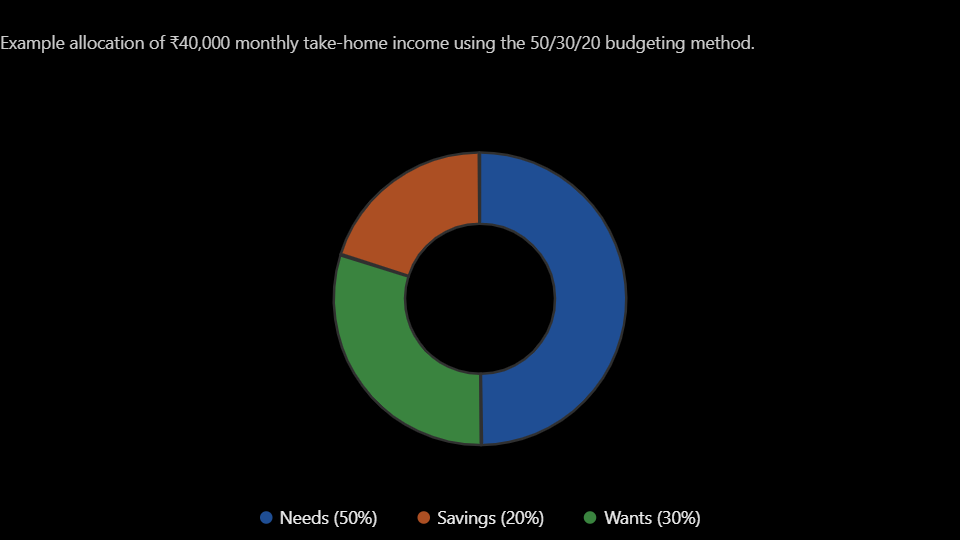
Suppose your monthly take-home income is ₹40,000.
Using the 50/30/20 rule:
Category | Percentage | Monthly allocation |
|---|---|---|
Needs | 50% | ₹20,000 |
Wants | 30% | ₹12,000 |
Savings and debt repayment | 20% | ₹8,000 |
Total | 100% | ₹40,000 |
Illustrative example using Indian rupees.
Example allocation of ₹40,000 monthly take-home income using the 50/30/20 budgeting method.
50/30/20 Rule Calculator: Try Your Own Income
Use this simple calculator to estimate how much money could go towards each category.
Monthly take-home income
Needs
50% of income
₹40,000
₹20,000
Wants
30% of income
₹40,000
₹12,000
Savings and debt repayment
20% of income
₹40,000
₹8,000
The calculator uses the standard 50/30/20 split. Adjust the percentages to suit your actual circumstances when creating your budget.Is the 50/30/20 Rule Suitable for Everyone in India?
Not necessarily.
Someone living in a metro city with high rent may spend more than 50% of their income on essential expenses. A person supporting family members may also have different financial priorities.
For example, someone earning ₹25,000 per month might find it difficult to allocate 20% towards savings immediately.
In such cases, a modified budget could be more practical:
60% for needs.
25% for wants.
15% for savings.
The objective is to develop a sustainable financial routine. You can gradually improve your savings allocation as your income increases or expenses decrease.
A 50/30/20 rule calculator India can help you understand the framework, but your actual budget should reflect your financial circumstances.
How to Use a Monthly Budget Template in Excel or Google Sheets
If you prefer organizing your finances digitally, a spreadsheet is one of the easiest ways to manage a monthly budget.
You do not need advanced Excel skills to create a useful budget spreadsheet. A basic spreadsheet with income, expense categories, planned amounts, and actual spending is enough to get started.
You can use Microsoft Excel or Google Sheets depending on your preferences.
Option 1: Excel Budget Template
An Excel budget template is a pre-designed spreadsheet that allows you to enter your financial information without creating everything from scratch.
Microsoft provides customizable budget templates for personal budgeting, household expenses, college budgets, and other financial planning needs. Many templates include built-in formulas for calculating totals.
Official resource: Explore Microsoft Excel Budget Templates.
An Excel budget template can help you:
Record monthly income.
Organize fixed and variable expenses.
Compare planned and actual spending.
Calculate remaining balances.
Track monthly savings.
Review spending patterns through charts.
How to use an Excel budget template:
Open Microsoft's budget template collection.
Select a personal or monthly budget template.
Open the template in Excel.
Replace the sample figures with your actual income and expenses.
Customize categories according to your needs.
Update your transactions regularly.
Review the monthly summary.
You can also create your own budget excel template by adding formulas to calculate total income, expenses, and remaining balances.
Option 2: Google Sheets Budget Template
A Google Sheets budget template is useful if you want to manage your finances online and access your budget from different devices.
Unlike a traditional offline spreadsheet, Google Sheets allows you to work on your budget through a web browser and collaborate with other people when sharing permissions allow it.
You can create a budget template Google Sheets document with separate sections for income, expenses, savings, and monthly summaries.
How to create a Google Sheets budget template:
Open Google Sheets.
Create a blank spreadsheet.
Add your monthly income at the top.
Create expense categories.
Add columns for planned and actual expenses.
Insert formulas to calculate totals.
Create a separate savings section.
Add charts to visualize your spending.
Here is a useful example of a shared spreadsheet resource:
Open the Google Sheets Budget Template.
Check the sharing permissions before using it. If you cannot edit the original, use the File menu to make your own copy, provided the owner allows copying.
Monthly Budget Template Google Sheets: Recommended Structure
A good monthly budget template Google Sheets document should contain the following columns:
Category | Planned budget | Actual spending | Remaining |
|---|---|---|---|
Income | ₹40,000 | ₹40,000 | ₹0 |
Rent | ₹8,000 | ₹8,000 | ₹0 |
Groceries | ₹5,000 | ₹5,500 | -₹500 |
Transportation | ₹2,000 | ₹1,700 | ₹300 |
Entertainment | ₹1,000 | ₹800 | ₹200 |
Savings | ₹5,000 | ₹5,000 | ₹0 |
The numbers above are illustrative.
A well-organized Google sheet budget template should also include:
Monthly income summary.
Expense category breakdown.
Savings tracker.
Debt repayment section.
Monthly spending comparison.
Financial goals.
Notes for unexpected expenses.
You can create a separate tab for each month or maintain a single annual budget spreadsheet with monthly columns.
Useful Google Sheets Formulas for Budgeting
Here are a few simple formulas that can make your spreadsheet more useful.
Purpose | Formula example |
|---|---|
Total income |
|
Total expenses |
|
Remaining balance |
|
Savings percentage |
|
Average monthly expense |
|
These are examples. Adjust cell references according to your spreadsheet layout.
Excel vs. Google Sheets: Which Is Better?
Feature | Microsoft Excel | Google Sheets |
|---|---|---|
Budget templates | Yes | Yes |
Offline access | Yes, depending on setup | Limited offline setup |
Online collaboration | Yes | Yes |
Formula support | Extensive | Extensive |
Charts and reports | Yes | Yes |
Best suited for | Detailed spreadsheet management | Simple online budgeting and collaboration |
Which should you choose?
Choose Excel if you prefer advanced spreadsheet features, detailed financial analysis, or offline work.
Choose Google Sheets if you want a simple online budget spreadsheet that you can access and update across devices.
Both can work effectively as a monthly budget planner.
What Is a Budget Tracker and How Does It Help?
A budget tracker is a tool that records your income and expenses and compares your actual spending against your planned budget.
While a budget planner helps you decide how much to allocate, a budget tracker helps you monitor whether you are following that plan.
For example, you might allocate ₹5,000 for groceries at the beginning of the month.
Your budget tracker records each grocery purchase and updates the remaining balance.
If you spend ₹3,500 during the first three weeks, you know that ₹1,500 remains for the rest of the month.
What Should a Good Budget Tracker Include?
An effective budget tracker should provide:
Transaction date.
Expense description.
Spending category.
Payment method.
Amount spent.
Monthly spending limit.
Remaining budget.
Monthly summary.
You can maintain this information in a notebook, Excel spreadsheet, Google Sheets, or a budgeting app.
Daily, Weekly, or Monthly Tracking: Which Is Better?
The best tracking frequency depends on your spending habits.
Daily tracking: Useful if you frequently make small purchases or struggle with impulse spending.
Weekly tracking: Useful for reviewing groceries, entertainment, and transportation expenses.
Monthly tracking: Useful for comparing overall income, expenses, and savings.
For beginners, daily expense recording combined with a weekly review is a practical approach.
It helps you identify problems before the end of the month.
How to Use a Budget Calculator and Expense Calculator
A budget calculator helps estimate how your income should be distributed across different financial categories.
An expense calculator helps calculate the total amount you spend on individual purchases, bills, and other financial commitments.
Both tools can make budgeting easier by reducing manual calculations.
Make Expense Tracking Easier With a Printable Budget Workbook
Calculating your monthly expenses is useful, but consistently recording your spending is even more important.
Our 20-page Budget Planner includes dedicated worksheets for:
Monthly planned versus actual expenses.
Weekly spending categories.
Daily purchase records.
Grocery and meal planning.
Bills and fixed expenses.
These printable pages help you turn your budgeting calculations into an organized monthly routine.
[Explore the Ultimate Budget Planner]
Budget Calculator: Example
Suppose your monthly take-home income is ₹50,000.
You want to understand how much money remains after your planned expenses.
Expense category | Amount |
|---|---|
Rent | ₹10,000 |
Groceries | ₹6,000 |
Transportation | ₹3,000 |
Utilities | ₹2,000 |
Loan EMI | ₹5,000 |
Entertainment | ₹2,000 |
Shopping | ₹2,000 |
Total expenses | ₹30,000 |
Your remaining balance is:
This ₹20,000 can be allocated towards savings, additional debt repayment, investments, and other financial priorities.
Remember that the remaining balance is not automatically disposable income. Account for upcoming bills and irregular expenses before deciding how to use it.
Expense Calculator: How to Calculate Monthly Spending
You can calculate monthly expenses using a simple formula:
For example:
Expense | Amount |
|---|---|
Rent | ₹8,000 |
Groceries | ₹4,000 |
Electricity | ₹1,000 |
Internet | ₹500 |
Transportation | ₹1,500 |
Other expenses | ₹2,000 |
Total | ₹17,000 |
Your total monthly spending in this example is ₹17,000.
How to Calculate Your Savings Rate
Your savings rate shows what percentage of your income you save.
Use this formula:
For example, if your income is ₹40,000 and your savings are ₹8,000:
Your savings rate is 20%.
Tracking this percentage over time can help you understand whether your savings habits are improving.
What Is a Budget Score? How Can You Measure Your Budgeting Performance?
A budget score is a simple self-assessment measure that helps you understand how consistently you manage your monthly finances.
There is no single universally accepted budget score or official scoring formula. You can create your own score based on the financial habits that matter most to you.
For example, you can assess your budgeting performance using five factors:
Budgeting factor | Maximum points |
|---|---|
Staying within your spending limits | 25 |
Recording expenses regularly | 20 |
Meeting your savings target | 25 |
Paying bills on time | 15 |
Reviewing your budget monthly | 15 |
Total | 100 |
How to Interpret Your Budget Score
Score | Interpretation |
|---|---|
90–100 | Excellent budgeting consistency |
75–89 | Good financial discipline |
60–74 | Some improvements needed |
40–59 | Review your spending habits |
Below 40 | Rebuild your budgeting routine |
These are suggested personal benchmarks, not financial industry standards or credit scores.
A high budget score does not necessarily mean you are wealthy. It simply indicates that you are following your own financial plan consistently.
Someone earning ₹20,000 can have excellent budgeting habits, while someone earning ₹1,00,000 can struggle with overspending.
The purpose of a budget score is to measure progress, not compare your financial situation with someone else's.
Best Budgeting Apps to Track Expenses and Manage Money
If you prefer managing your finances using your smartphone, budgeting applications can simplify expense tracking.
Many apps provide transaction records, category-wise spending reports, budget limits, and financial summaries.
However, not every application offers the same features, pricing, or bank integrations.
Here are some options worth exploring.
Feature descriptions are based on the providers' published information. Availability and pricing can change by country and subscription plan.
1. Goodbudget
Best for: Envelope budgeting
Goodbudget uses the envelope budgeting method. You divide your available money into virtual envelopes for different spending categories, such as groceries, rent, entertainment, and savings.
Website: Goodbudget
Useful features include:
Virtual spending envelopes.
Income and expense tracking.
Spending reports.
Debt repayment planning.
Budget sharing across devices.
Goodbudget offers a free plan with limited envelopes and accounts, alongside paid plans with additional features.
2. Spendee
Best for: Visual expense tracking
Spendee helps users organize expenses and monitor spending through budgets and financial summaries.
Website: Spendee
Its budgeting features include:
Expense categorization.
Budget limits.
Spending notifications.
Shared wallets on supported plans.
Financial overviews.
Spendee's documentation states that its free plan includes one budget, while paid plans offer additional budgeting capacity.
3. Google Sheets
Best for: Custom budgeting
Google Sheets is useful if you want to build your own budget tracker instead of relying on a dedicated budgeting app.
Website: Google Sheets
You can create custom expense categories, monthly summaries, savings trackers, and financial dashboards.
4. Microsoft Excel
Best for: Detailed financial planning
Excel is useful for people who want more control over formulas, reports, charts, and budget calculations.
Templates: Excel Budget Templates
You can create an annual budget, track monthly expenses, compare actual spending, and calculate savings.
5. MoneyHelper Budget Planner
Best for: Understanding income and expenses
MoneyHelper offers an online budget planner that adds up income and spending to show what remains and where savings may be possible.
Website: MoneyHelper Budget Planner
It is designed around UK financial categories and should be adapted if you are using it in India.
Which Is the Best Budget App Free?
There is no single best budget app free for everyone.
Your choice should depend on how you want to manage money.
Your requirement | Suggested option |
|---|---|
Envelope-based budgeting | Goodbudget |
Visual expense tracking | Spendee |
Custom spreadsheet budgeting | Google Sheets |
Detailed calculations and reports | Excel |
Guided online budget planning | MoneyHelper |
Before connecting any financial account to an app, review its privacy policy, permissions, data handling practices, and supported banking integrations.
If you do not want to share financial account information, manual expense tracking through Excel or Google Sheets is a reasonable alternative.
Practical Monthly Budget Planner Example for Different Income Levels
One budgeting method will not work equally well for everyone.
Your income, rent, family responsibilities, debt, and location influence how much you can spend and save.
Here are three illustrative monthly budget examples using Indian rupees.
Example 1: Monthly Budget for ₹20,000 Income
Category | Allocation |
|---|---|
Rent and housing | ₹5,000 |
Groceries | ₹4,000 |
Transportation | ₹1,500 |
Utilities and mobile | ₹1,000 |
Personal expenses | ₹1,500 |
Emergency savings | ₹2,000 |
Other expenses | ₹2,000 |
Additional savings | ₹3,000 |
Total | ₹20,000 |
This example assumes relatively low housing costs. If your rent or family obligations are higher, adjust the savings allocation accordingly.
Example 2: Monthly Budget for ₹40,000 Income
Category | Allocation |
|---|---|
Rent | ₹8,000 |
Groceries | ₹5,000 |
Transportation | ₹2,000 |
Utilities | ₹1,500 |
Loan repayment | ₹4,000 |
Shopping and entertainment | ₹3,500 |
Emergency savings | ₹5,000 |
Other savings | ₹6,000 |
Other expenses | ₹5,000 |
Total | ₹40,000 |
This budget allows for debt repayment, savings, and lifestyle spending while maintaining a clear spending structure.
Example 3: Monthly Budget for ₹60,000 Income
Category | Allocation |
|---|---|
Housing | ₹12,000 |
Groceries | ₹7,000 |
Transportation | ₹3,000 |
Utilities | ₹2,000 |
Insurance and healthcare | ₹3,000 |
Loan repayment | ₹5,000 |
Entertainment and shopping | ₹5,000 |
Emergency savings | ₹8,000 |
Other financial goals | ₹10,000 |
Other expenses | ₹5,000 |
Total | ₹60,000 |
These examples are starting points, not recommended spending limits. A household with dependents, significant EMIs, or high medical costs may need a different allocation.
Common Monthly Budgeting Mistakes to Avoid
Creating a budget is relatively simple. Following it consistently is where many people face difficulties.
Avoid these common mistakes.
1. Forgetting Small Expenses
People often record major expenses but overlook small purchases.
Daily snacks, delivery charges, convenience fees, and online subscriptions can add up.
Record every transaction, regardless of its amount.
2. Setting Unrealistic Savings Goals
Trying to save 50% of your income immediately may not be realistic if you have significant essential expenses.
Start with an achievable amount and increase it gradually.
3. Ignoring Irregular Expenses
Some expenses occur only once or twice a year.
Examples include:
Vehicle insurance.
Annual subscriptions.
School admission fees.
Festival shopping.
Home maintenance.
Medical check-ups.
Estimate these costs and set aside money every month.
For example, if an annual insurance premium is ₹12,000, setting aside ₹1,000 monthly can help you prepare for the payment.
4. Not Tracking Cash Transactions
Many people track online payments but forget cash purchases.
Your budget should include both digital and cash transactions to provide an accurate picture of spending.
5. Using Too Many Budgeting Tools
You do not need five different applications and multiple spreadsheets to manage your money.
Choose one primary budgeting system and use it consistently.
6. Treating the Budget as Permanent
Your financial responsibilities can change.
Update your budget when you receive a salary increase, move to a different home, take a loan, or experience a major change in income.
7. Not Reviewing Your Financial Progress
A budget is useful only when you review the information it collects.
Set aside 15–30 minutes every week to check your spending and adjust your plan.
How to Build an Effective Budgeting Routine: A 30-Day Plan
If you are new to budgeting, do not try to change all your financial habits in one day.
Instead, follow a simple 30-day routine that helps you understand your spending and develop consistency.
Timeline | What you should do |
|---|---|
Days 1–3 | Calculate your monthly income and list financial commitments |
Days 4–7 | Record all expenses and categorize transactions |
Days 8–10 | Identify unnecessary and recurring expenses |
Days 11–15 | Create your monthly budget and set spending limits |
Days 16–20 | Start tracking actual expenses |
Days 21–25 | Review spending and adjust your allocations |
Days 26–30 | Calculate savings, review progress, and prepare next month's budget |
At the end of 30 days, you should have a better understanding of:
Your average monthly expenses.
Your biggest spending categories.
Your savings habits.
Your recurring financial commitments.
Areas where you can reduce spending.
Remember that budgeting is a continuous process. The objective is to build a system that you can maintain throughout the year.
Additional Resources to Improve Your Budgeting Skills
If you want to learn more about personal budgeting, explore these resources:
Resource | What you can learn |
|---|---|
Organizing income and expenses | |
Calculating income, spending, and remaining money | |
Creating and customizing budget spreadsheets | |
Working with a spreadsheet-based budget | |
Digital expense tracking | |
Envelope-based budgeting | |
Exploring another monthly budgeting tool | |
Discovering budgeting ideas and layouts | |
Exploring printable budget planner inspiration |
Use these resources according to your needs. Some tools are designed for specific countries, so check whether their currency, expense categories, and financial assumptions are suitable for your situation.
Frequently Asked Questions About Monthly Budget Planners
Here are answers to common questions about monthly budgeting, expense tracking, and financial planning.
1. What is the best monthly budget planner?
The best monthly budget planner is one that makes it easy to record income, track expenses, set savings goals, and review spending.
Excel and Google Sheets are useful for customizable budgeting, while applications such as Goodbudget and Spendee offer digital expense tracking.
Your ideal choice depends on your preferred budgeting method and the features you need.
2. How do I create a monthly budget with a low salary?
Start by calculating your take-home income and identifying essential expenses such as rent, groceries, transportation, utilities, and debt payments.
Next, set realistic limits for discretionary spending and save a manageable amount whenever possible.
If your income is limited, focus on controlling unnecessary expenses rather than following an unrealistic savings percentage.
3. What is the 50/30/20 budgeting rule?
The 50/30/20 rule is a budgeting method that allocates 50% of after-tax income to needs, 30% to wants, and 20% to savings and debt repayment.
For example, someone earning ₹40,000 per month would allocate ₹20,000 to needs, ₹12,000 to wants, and ₹8,000 to savings and debt repayment.
The percentages can be adjusted based on individual circumstances.
4. How much should I save every month?
There is no fixed savings amount that works for everyone.
The right amount depends on your income, expenses, debt, dependents, and financial goals.
The 50/30/20 method suggests allocating 20% of take-home income to savings and debt repayment, but beginners can start with a smaller sustainable contribution.
5. Is Google Sheets good for monthly budgeting?
Yes. Google Sheets is useful for monthly budgeting because you can create custom expense categories, calculate totals, track savings, and review spending.
It also supports collaboration and online access, depending on your account and device setup.
6. Is Excel better than Google Sheets for budgeting?
Both are effective.
Excel is suitable for detailed financial calculations, advanced formulas, and complex reporting.
Google Sheets is convenient for simple online budgeting and sharing.
The best option is the one you can update consistently.
7. What is the best free budget app?
Goodbudget, Spendee, and spreadsheet applications are worth considering.
Goodbudget offers a free envelope-based budgeting plan, while Spendee provides a free plan with limited budgeting features.
Compare their current features, pricing, and availability before choosing one.
8. What is a budget tracker?
A budget tracker is a tool that records income and expenses and compares actual spending with planned spending.
It helps you understand where your money goes and whether you are staying within your monthly spending limits.
9. How can I calculate my monthly expenses?
Add together all your monthly expenses, including rent, groceries, utilities, transportation, loan payments, subscriptions, and personal spending.
You can use a spreadsheet, expense calculator, or budgeting application to calculate the total.
For annual expenses, divide the estimated yearly cost by 12 to understand how much to set aside each month.
10. What is a budget score?
A budget score is a self-assessment measure that evaluates how consistently you follow your financial plan.
You can calculate it using factors such as spending discipline, expense tracking, savings progress, timely bill payments, and monthly reviews.
There is no universally standardized budget score.
11. Should I create a monthly or yearly budget?
Ideally, create both.
A monthly budget helps you manage everyday income and expenses, while a yearly budget helps you prepare for annual payments, larger purchases, holidays, and long-term financial goals.
A yearly plan can be divided into 12 monthly budgets.
12. How can I reduce unnecessary monthly expenses?
Start by reviewing your bank statements and expense tracker.
Look for unused subscriptions, frequent food delivery, unnecessary shopping, and recurring charges.
Prioritize reducing expenses that do not contribute significantly to your needs or financial goals.
13. How much emergency savings should I have?
A commonly used starting goal is to build an emergency fund covering three to six months of essential living expenses.
However, the appropriate amount depends on income stability, dependents, existing insurance, and other financial responsibilities.
You can build this fund gradually through regular monthly contributions.
14. Can I use a monthly budget planner for a family?
Yes. A family budget planner can help organize household income, rent, groceries, education, healthcare, transportation, savings, and shared financial goals.
It can also help family members understand spending responsibilities and plan upcoming expenses together.
15. How often should I update my budget?
Record expenses regularly, review your budget weekly, and prepare a new monthly plan at the beginning of each month.
You should also update it whenever your income, expenses, or financial responsibilities change significantly.
Ready to Take Control of Your Financial Goals?
A good financial plan should cover more than monthly expenses. It should also help you save for future goals, manage debt, prepare for emergencies, and review your progress.
Our Ultimate Budget Planner brings these activities together in one 20-page printable workbook.
Whether you are planning a vacation, building an emergency fund, paying off debt, or developing better spending habits, the worksheets give you a structured place to record your progress.
Your financial journey starts with a plan.
[Get Your Ultimate Budget Planner – Start Planning, Saving & Growing]
Conclusion: Take Control of Your Money With a Monthly Budget Planner
Managing money effectively starts with understanding your income, expenses, and financial priorities.
A monthly budget planner gives you a structured way to organize your finances, identify unnecessary spending, set realistic savings goals, and prepare for unexpected expenses.
You do not need expensive software or advanced financial knowledge to get started. A simple spreadsheet, printable budget template, or budgeting application can help you develop better money-management habits.
Start with these five actions:
Calculate your monthly take-home income.
List your fixed and variable expenses.
Set a realistic savings target.
Track your spending regularly.
Review your financial progress every month.
Do not worry about creating a perfect budget immediately. Start with a simple plan, understand your spending patterns, and improve your financial habits over time.
Your financial goals become easier to manage when every rupee has a purpose.